6 min read
How to Turn Your WhatsApp Chats Into a Beautiful Chatbook
From an ordinary WhatsApp export to a book you can actually hold, gift, and keep.
Priya Sharma
August 24, 2026
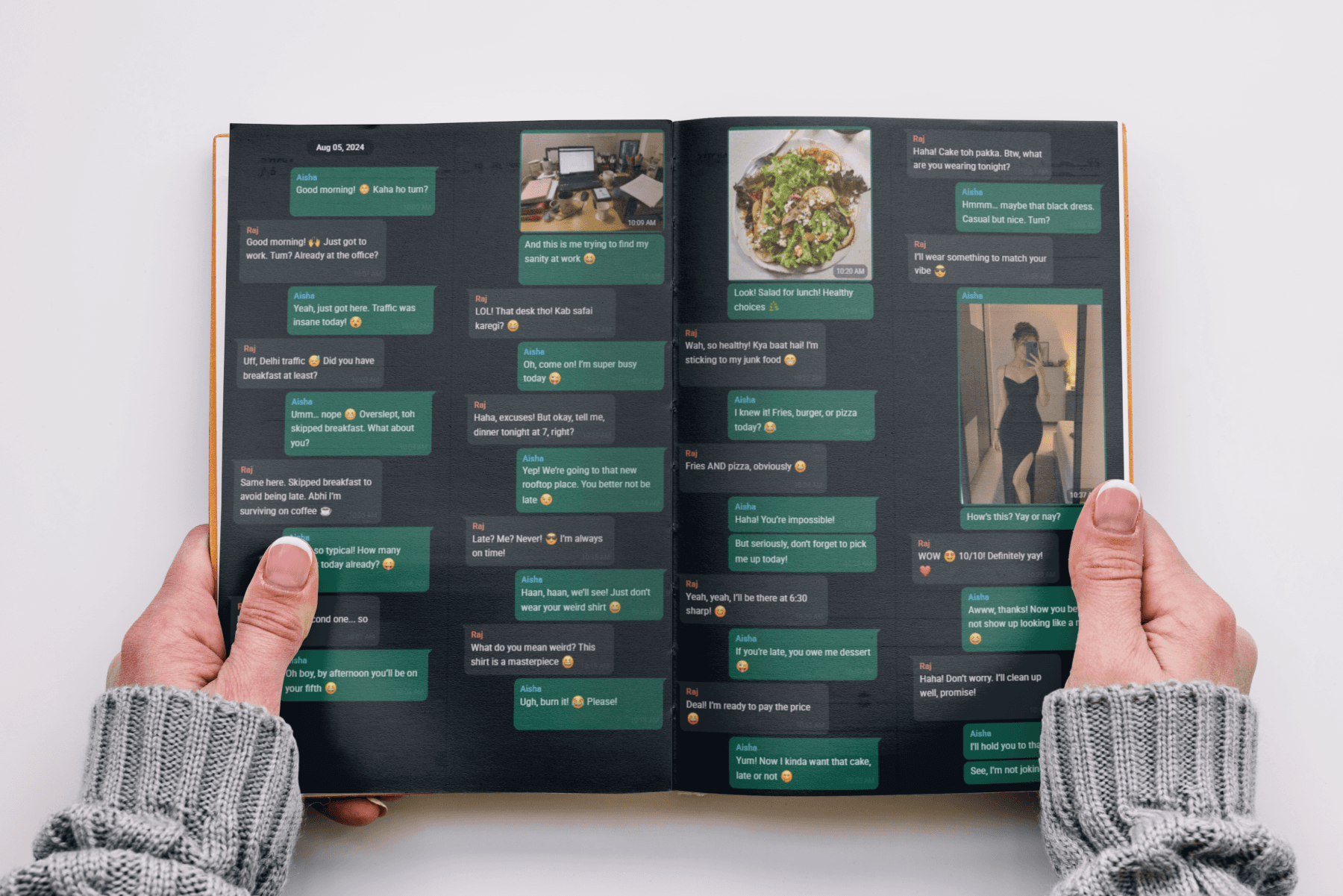
Your chat already contains the memories. The chatbook simply gives them somewhere to live.
A WhatsApp chat can look like a pile of ordinary messages until you scroll far enough back. Then you find the first joke you both remember, the night you stayed awake talking, the plans that never happened, and the tiny sentences that somehow became part of your shared history. A chatbook takes those moments out of a screen and gives them a physical place to live.
The process is much simpler than it sounds. You export the conversation from WhatsApp, upload the file to Memreesh, choose the part of the conversation you want to keep, and shape the result into a book. You do not need to manually copy thousands of messages or format every page yourself.
The idea: your chat is already the raw material
Think of a chatbook as a printed version of a conversation that matters to you. The words are yours. The dates are real. The little spelling mistakes and ridiculous inside jokes are part of the story too. Memreesh handles the repetitive work of turning that raw export into a readable visual layout.
The goal is not to make the conversation look like a spreadsheet. It is to make it feel like something you would want to open years from now. That is why the first decision is not about fonts or colours. It is about deciding which part of the story deserves to be kept.
💭
Start with a story
You do not have to preserve every message. A chatbook can be a whole relationship, one unforgettable year, the weeks before a wedding, your first semester together, or simply the conversations you never want to lose.
·
·
·
Export your WhatsApp chat
WhatsApp already gives you the export file Memreesh needs. If you have not done it before, the process is quick on both iPhone and Android. For most chatbooks, choose the text-only option. It keeps the export lightweight and gives you more control over which photographs make it into the final book.
1
Open the conversation you want to preserve
Choose the one-on-one or group chat that contains the memories you want in your book.
2
Open the chat information menu
On iPhone, tap the contact or group name. On Android, open the three-dot menu and choose More.
3
Choose Export Chat
WhatsApp will ask whether you want to include media. Choose Without Media for the simplest workflow.
4
Save the exported file
Keep the resulting .zip somewhere easy to find. You can upload that zip directly to Memreesh.
📦
Keep the ZIP
You usually do not need to open or re-save the text file inside the export. Uploading the original .zip preserves the exported data in the form WhatsApp created it.
·
·
·
Upload it to Memreesh
Once you have the export, start a new chatbook in Memreesh and choose WhatsApp as the platform. Upload the exported file and let the editor parse the conversation. Instead of staring at a wall of timestamps and names, you will get a visual preview that you can work with.
Your workflow
Usually a few minutes
01
Export
Get the conversation from WhatsApp.
02
Upload
Give Memreesh the exported file.
03
Curate
Choose the dates and moments that matter.
04
Design
Pick the look, cover, and page details.
05
Create
Download the PDF or order a printed book.
·
·
·
Choose the memories, not just the messages
This is where a chatbook becomes personal. A five-year conversation might contain tens of thousands of messages, but you probably do not want every single one in the final book. Start by thinking about the chapter you are trying to preserve.
A relationship
Choose the period from your first conversations through a meaningful milestone.
A friendship
Pick the funniest, strangest, and most ordinary conversations that capture what the friendship feels like.
College memories
Use semesters, trips, festivals, late-night plans, and the conversations around them as natural chapters.
A family archive
Select birthdays, festivals, weddings, childhood stories, and the everyday messages that become precious later.
The best pages are not necessarily the most dramatic ones. Sometimes a two-line conversation is enough to bring an entire year back.
·
·
·
Make the book feel like yours
Once the conversation is narrowed down, the design choices start to matter. Choose a theme that matches the story rather than trying to make every page visually loud. A clean layout usually gives the words more room to breathe.
You can also add photos selectively. Instead of importing every image ever shared in the conversation, choose the handful that immediately mean something: the first picture together, the blurry photo from a late-night walk, the screenshot you still laugh about, or the place you both kept talking about.
📷
Less can be more
A few meaningful photographs usually tell the story better than hundreds of random images. Let the conversation remain the main character.
·
·
·
Create a cover that says something
The cover is the first thing you will see years later, so it is worth giving it a little thought. It does not need to explain the entire book. A name, a date, a private joke, or a simple phrase can be enough.
Cover ideas
“The year we became us”
“Things we said at 2 AM”
“Us, in messages”
“2019 — 2026”
“For all the conversations I never want to forget”
·
·
·
Before you print
Read through the preview once from beginning to end. You are looking for the same things you would check in any book: awkward page breaks, moments that should be removed, a date range that is too broad, or a photograph that does not belong where it landed.
1
Read a few random pages
Make sure the typography and spacing feel comfortable at normal reading size.
2
Check names and dates
Make sure the conversation starts and ends where you intended.
3
Look at image placement
Make sure important photos are not competing with important messages.
4
Check the cover
Read the title as if you were receiving the book as a gift.
5
Keep a final PDF
Save a digital copy even if you order the printed version.
·
·
·
The finished book
The strange thing about turning a chat into a book is how quickly the messages stop feeling like messages. On a screen, you tend to remember the latest conversation. In a book, you see the distance between moments. You notice how your way of speaking changed, which jokes survived, when someone started using a nickname, and how an ordinary Tuesday became part of a much bigger story.
That is the real reason to make a chatbook. It is not just another way to back up your WhatsApp data. It is a way of turning something digital and easy to overlook into an object that can sit on a shelf, travel across a room, or be handed to someone with the words: “I made this for us.”
Your chat was never just a chat. It was a record of the time you spent being there for each other.
·
·
·
Frequently asked questions
Do I need to manually copy my WhatsApp messages?
No. Export the conversation from WhatsApp and upload the resulting file. Memreesh handles the conversion and layout.
Should I export with media?
For most chatbooks, text-only is the easiest starting point. You can then choose the photographs you actually want in the book rather than importing everything.
Can I make a book from a group chat?
Yes. A group conversation can be turned into a chatbook too, with messages attributed to the different participants.
Can I choose only part of a long conversation?
Yes. If the export contains more messages than you want, narrow the project down to the date range or chapter that matters to you.
Can I get a digital version as well as a printed book?
Yes. Once the layout is ready, you can keep a PDF version and use the finished design for a printed chatbook.
Share this article
What people are making
Real chatbooks, real memories
Create yours
Ananya & Rohan
4 years of WhatsApp · Wedding gift
The Mehta Family
Family group chat · 2020–2024
Shreya & Priya
10 years of friendship · Birthday gift
Class of 2026
IIT Kanpur · 2022–2026
